
Contact Information
- Name: Aman Arora
- E-Mail: aman.arora9848@gmail.com
- Country: India (GMT+5:30)
- Address: Panchkula, Haryana, India
- GitHub Username: amanarora9848
- IRC Nick: amanarora9848
- LinkedIn: https://www.linkedin.com/in/aman-arora9848/
Google Doc Link of the Proposal
Introduction
- I am Aman Arora, a graduate Electronics and Communication Engineer from Thapar Institute of Engineering and Technology. I have previously worked at Apple India as a Network Automation Engineer, where I helped drastically reduce the MTTR (Minimum Time to Resolve) of the organization-wide network-infrastructure-related Incidents by creating scalable automation solutions.
- During my undergraduate, I have won various Hackathons throughout India (including the prestigious Smart India Hackathon) and worked on several projects on IoT and Embedded Systems (using Raspberry Pi, NodeMCU, and Arduino), Python, C++, and ROS (Robot Operating System). These experiences helped me enhance my Hardware and Software Engineering skills, programming, and problem-solving abilities.
- My interest in Software Development, Robotics, and Embedded Systems stems from my goal to develop efficient, fault-tolerant systems for the betterment of all. Moreover, many similar past experiences (including being a Data Acquisition Engineer at Formula Student Team Fateh) have further increased my interest in Embedded Software Development for automotive applications and have inspired me to become a better engineer.
About the Organization
Organization
Group
Mentors
About
- The Linux Foundation is a non-profit technology consortium supporting and promoting Linux and its commercial adaptation. Its purpose is to build sustainable ecosystems around open source projects to accelerate technology development and commercial adoption.
- Automotive Grade Linux is a collaborative open-source project hosted by The Linux Foundation that accelerates the growth, development, and adoption of an open-source software stack for automotive applications.
Project of Interest <GSoC’22 AGL>
An Offline Voice-agent for Automotive Grade Linux
- Create a new Yocto Layer and integrate it with the Vosk Offline Speech Recognition toolkit to add Speech Recognition capability in AGL.
- Develop the voice-agent to execute basic commands that can interact with different applications (like the infotainment system, navigation, HVAC) and perform different functions.
- This project will add the capability to run an offline voice-agent for AGL. This can eventually give users the ability to choose between online and offline stack (depending on network availability, with minor trade-offs in the accuracy) and perform functions specific to the vehicle.
Deliverables
- Create and configure a custom layer for an offline voice agent: meta-voice-agent with Automotive Grade Linux layers.
- Use the Vosk Offline Speech Recognition toolkit for the speech recognition tasks. Include existing recipes, or create custom ones (as required) for required packages and dependencies. Test the application.
- Use the offline ‘voice-agent’ to perform real tasks by recognizing and executing respective commands for different applications.
- Document the implementation and procedure, since it will help to keep the project development running smoothly. Write proper documentation for tasks completed during GSoC.
Project Description
Objective 1: Create a new Yocto Layer meta-agl-devel/meta-voice-agent and integrate it with the Vosk Offline Speech Recognition toolkit to add Speech Recognition capability in AGL.
-
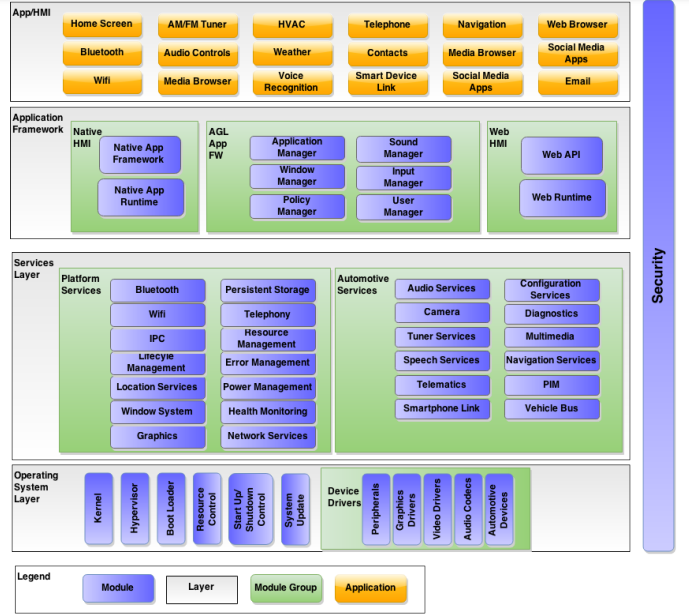
Automotive Grade Linux is a collaborative, open-source project for the purpose of building open source software based on Linux for automotive applications. Its Unified Code Base (UCB) can power heterogeneous software applications like IVI, Instrument Clusters, and telematics in the vehicle. It is developed using the Yocto Project.
-
Why Yocto Project?
Yocto Project is an open-source project that allows people to build custom Linux systems from the ground up, and thus, one can create user application-specific systems based on the Linux kernel. Some of the best reasons to use the Yocto Project are:- It provides a wide hardware architecture support (ARM, PPC, MIPS, x86), thanks to the Board Support Package (BSP).
- Developers can customize their systems in terms of speed, memory footprint, and memory utilization.
- It provides extensive flexibility, and one can build custom Linux distros on top of existing ones.
- Active community and a lot of existing layers and recipes.
-
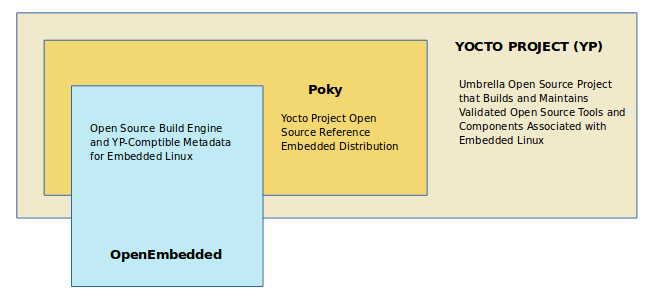
Yocto combines, maintains, and validates 3 development elements: an OpenEmbedded build system, a reference distribution, and a set of integrated tools that ease and enable working with embedded Linux.
-
The project grew from and is based on the OpenEmbedded Project, which is where the build system and some of the meta-data are derived from. The OpenEmbedded Project co-maintains the OE-core build system and provides a central point for new metadata.
-
Poky ⇒ OpenEmbedded Build system + metadata
- Metadata: Task definitions / Set of instructions. This contains the files that the OpenEmbedded build system parses when building an image. Includes recipes, configuration files, and instructions on how to build an image.
-
Open Embedded Build system ⇒ BitBake + OE-Core (meta/ directory)
- BitBake: A task executor and scheduler. It is a build engine that works through recipes written in a specific format in order to perform sets of tasks.
- OpenEmbedded-Core: OpenEmbedded-Core (OE-Core) is a common layer of metadata (i.e. recipes, classes, and associated files) used by OpenEmbedded-derived systems, which includes the Yocto Project. It consists of foundation recipes, classes, and associated files that are meant to be common among many different OpenEmbedded systems.
-
-
Particularly in the Yocto infrastructure, packages are grouped into layers and recipes are part of layers that are nothing but individual pieces of software. Layers are different kinds of repositories or folders and multiple recipes can be present within each layer. Different components of the Yocto project:
- Configuration files (.conf): Global definition variables [types of machine architecture, global variables, build path, compiler flags]
- Classes (.bbclass): Used to abstract common functionality and share it amongst multiple recipe (.bb) files [defines how we build Linux kernel, how to generate RPM package, how to create root file system image]
- Recipes (.bb): Logical units of SW / Images to build [individual piece of SW to be built, what packages get included in the final file system image. Recipes include metadata for the SW such as where we download upstream sources from, build or runtime dependencies, what feature we enable in our application, configuration, compilation options, define what files go into what output package]
- Layers (bblayers): Repositories that contain related metadata, set of recipes. Different Yocto layers exist in AGL, such as
- poky
- meta-agl
- meta-agl-cluster-demo
- meta-agl-demo
- meta-agl-devel
- meta-agl-extra
- meta-agl-telematics-demo
- meta-openembedded
And so on…
- Board Support Package (BSP): It is a collection of information that defines how to support different hardware platforms or devices. Essentially, a BSP Layer = base directory + file structure.
- AGL supports the following hardware platforms. The different supported BSP layers are
- meta-intel
- meta-ti
- meta-raspberrypi4
- meta-renesas-rcar-gen3
- meta-sancloud
And so on…
-
- The AGL UCB is a Linux distribution built by a collaboration of automakers and suppliers to deliver modern in-vehicle infotainment and connected car experience. This provides really good hardware support, as listed here. This enables rapid innovation and development since UCB provides a starting point for the project, upon which an automaker can build customizations specific to their needs.
-
Vosk: A framework that provides state-of-the-art offline speech recognition capabilities, using advanced deep learning under the hood. The Vosk toolkit is based on the Kaldi-ASR project.
- Some highlights of Vosk are:
- Supports 20+ languages and dialects, including English, German, French, Italian, Spanish, Japanese, etc.
- Works offline and runs comfortably on lightweight devices.
- Availability of per-language models of less than 50MB each.
- Provides streaming API for the best user experience.
And so on…
- As a demo, the vosk-api repo was cloned and the test_microphone.py file stored in /vosk-api/python/example was run in a virtual environment after importing the English-small model:
    (vosk-test)infitrode@Aman-ThinkPad-E14-Gen3:~/vosk-api/python/example$ python3 test_microphone.py
    LOG (VoskAPI:ReadDataFiles():model.cc:213) Decoding params beam=10 max-active=3000 lattice-beam=2
    LOG (VoskAPI:ReadDataFiles():model.cc:216) Silence phones 1:2:3:4:5:6:7:8:9:10
    LOG (VoskAPI:RemoveOrphanNodes():nnet-nnet.cc:948) Removed 0 orphan nodes.
    LOG (VoskAPI:RemoveOrphanComponents():nnet-nnet.cc:847) Removing 0 orphan components.
    LOG (VoskAPI:CompileLooped():nnet-compile-looped.cc:345) Spent 0.0268691 seconds in looped compilation.
    LOG (VoskAPI:ReadDataFiles():model.cc:248) Loading i-vector extractor from model/ivector/final.ie
    LOG (VoskAPI:ComputeDerivedVars():ivector-extractor.cc:183) Computing derived variables for iVector extractor
    LOG (VoskAPI:ComputeDerivedVars():ivector-extractor.cc:204) Done.
    LOG (VoskAPI:ReadDataFiles():model.cc:281) Loading HCL and G from model/graph/HCLr.fst model/graph/Gr.fst
    LOG (VoskAPI:ReadDataFiles():model.cc:302) Loading winfo model/graph/phones/word_boundary.int
    ################################################################
    Press Ctrl+C to stop the recording
    ################################################################
    {
    "partial" : ""
    }
    {
    "partial" : "offline"
    }
    {
    "partial" : "offline"
    }
    {
    "partial" : "offline voice"
    }
    {
    "partial" : "offline voice agent"
    }
    ^C
    Done
By default, this example picks the model from the directory
model/stored in/vosk-api/python/examples/. We can define from where to fetch the model using the —model parameter while running the python script.-
Layers allow us to isolate different customizations from each other and keep our metadata modular and logically separated. Currently, there is no available OpenEmbedded Layer for Vosk and any other libraries that we might have to use for our application. Thus, it would be a good idea to create a new layer that takes care of the speech recognition application, using Vosk.
-
A few dependencies for our application are: | Dependency | Existing Recipes / To be created | | ---------- | -------------------------------- | | PyAudio · PyPI | Existing: python3-pyaudio | | sounddevice | Custom recipe to be created, if used |
-
Keeping the meta-agl-devel layer as the staging layer during development, a new layer, named
meta-voice-agent, for example, can be created for the purpose. Since the project is mostly python-based, we need to make sure that themeta-openembedded/meta-pythonlayer is included in our environment. -
With the introduction of the new Yocto Release 3.5, the python package build process is based on wheels. Thus, respective packaging classes will be used as mentioned in the documentation.
-
Next, create custom recipes for fetching the API and installing required dependencies (for the dependencies for which no recipe exists, or grab recipes from meta-openembedded (if they exist) to build and run Vosk. Since the required models for different languages are needed, we need to retrieve them from the Vosk repository. The respective model has to be stored at a preferred location and needs to be searched, depending on the selected language. A few things to note:
- The model path can be defined while calling the speech recognition module
- A config file that defines the required path(s) can be created to select the required model
- Recipes can be defined that create packages for respective models
-
With the help of example scripts provided by the vosk-api, python programs specific to our application can be written. Thus, different objectives can be achieved, from creating a simple demo for testing purposes to creating an application that uses Vosk for specific tasks. Vosk provides a vosk-server implementation as well. The demo application, if developed, can be based on HTML5/Flutter and will simply display what was detected.
-
AGL uses the pipewire daemon service for audio capture and playback. Pipewire (Gitlab) is a low-level multimedia framework that provides Graph-based processing, flexible media format negotiation, and real-time capable plugins among other things. Then, the session manager (WirePlumber) is a secondary process that also connects to pipewire as a client and can control the whole pipeline. WirePlumber provides an API to write tools that interact with PipeWire. It provides a daemon that is scriptable in Lua. For our application, when the speech recognition demo will be run, the other audio streams would need to go into the background. The corresponding policies will be managed by WirePlumber.
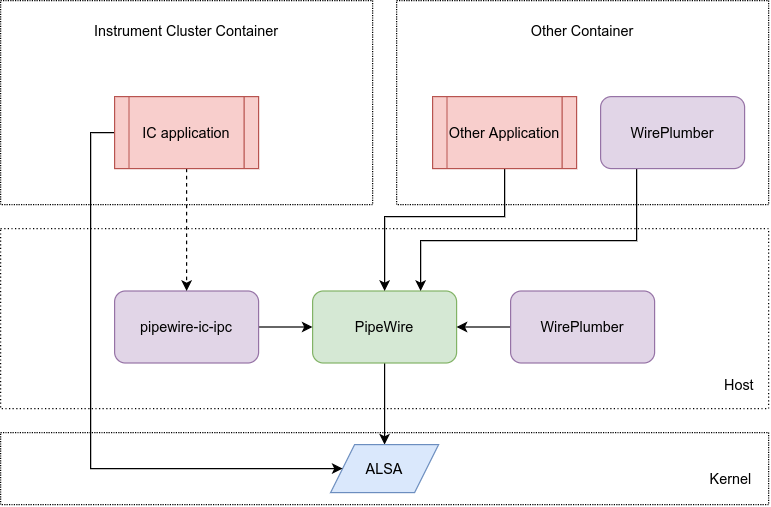
Vosk (python) depends on PyAudio, which provides Python bindings for PortAudio. Thus PortAudio modules are needed for a successful install of PyAudio on Linux. As per the PipeWire issue-PortAudio Support, PortAudio works with the JACK, Pulse, and ALSA libraries shipped with PipeWire.
- This objective will be complete with the creation and testing of a demo that recognizes the user’s audio input in a language of choice and gives a text output.
- Some highlights of Vosk are:
Objective-2: After completion of Objective-1, develop the voice-agent to execute basic commands and interact with different applications (like the infotainment system, navigation, HVAC) to perform different functions.
-
A voice agent that is capable of performing tasks will be based upon the following units:
- Stage - 1 ⇒ Activation: the agent needs to be activated using a prompt, either through an application or Graphical User Interface, or using wake words. Since we are using an offline speech recognition API, we can configure and identify trigger words using that itself.
- Stage - 2 ⇒ Response to the trigger input: This is the stage that will execute another function. Once the agent is triggered, it will listen for the command that the user wants to execute. After recognizing the command from the given set of commands, the suitable workflow for the function can be chosen and executed.
-
For our application, we can add two modes to trigger the voice agent:
- push-to-listen: the user presses a button on the UI to activate the speech recognizer
- using wake words: the speech recognizer keeps running and listening for wake words. A close implementation for the wake word plugin for Vosk has been done here.
-
The voice agent has to be integrated with the application for which the command is given. After recognition of the command, different functions can be performed, for example,
- Text-to-Speech: two open-source offline text-to-speech agents were found suitable for our application:
- Controlling basic functionalities of the infotainment system
- Temperature control for HVAC
- Navigation to a place spoken by the user
The methodology and approach would be finalized after deliberation with mentor (Jan-Simon Möller) at a later stage of GSoC.
Why this project?:
- I was briefly introduced to AGL while I was working as a Data Acquisition Engineer at the Formula Student Team of my University (Team Fateh). Even though I was not the primary developer working with AGL and was mostly engaged with the design team, I got familiar with this powerful open-source project and got fascinated with the concept of ‘Open-Source in every car’.
- More recently, I have been attending the AGL weekly developer calls regularly, and am slowly getting familiarized with the working of the organization, contribution guidelines, and development practices.
- Since I have been interested in Embedded Linux for a while, I believe that this project is a perfect platform for me to start and not only develop my skills in the domain, but also primarily make useful contributions to the organization over the period of GSoC.
- GSoC will not only provide me an opportunity to become a part and an active member of the Open Source Community and AGL but also provide me with the perks and prestige of being its part. Thus, I am highly motivated to participate in GSoC. Moreover, this will be the first time I will be actively making contributions to Open Source Code, after working on multiple Closed Source projects at my previous organization (Apple India).
Local System Information
-
Machine: Lenovo Thinkpad E14 Gen-3
-
Technical Specifications:
- Memory: 24GB
- Processor: 8 core AMD Ryzen 7 5700U
- Operating Systems:
- Windows 11
- Ubuntu 20.04 LTS
- Fedora 36
- Storage: 1TB
Timeline
-
Community Bonding Period [20/05 to 12/06]
- Minor contributions/fixes
- Read, research and gain experience with the tools and technologies such as
- Yocto Project
- AGL Documentation
- Vosk API
- Python Application Development on AGL
- Integration of PyAudio with PipeWire, orchestration
- Discuss the proposal with the team and look for possible changes or improvements.
-
Week 1 and 2 [13/06 to 26/06]
- Setup development repository
- Create a custom layer for the offline voice-agent on top of AGL Layers
- Import existing recipes for dependencies
-
Week 3 and 4 [27/06 to 10/07]
- Research, work out a proper way to store models for the Vosk API to function properly
- Write custom recipes for the unmet dependencies
-
Week 5 and 6 [11/07 to 24/07]
- Develop a demo to test the offline speech recognition function
-
Week 7 and 8 [25/07 to 07/08]
- Start further development of the offline voice-agent
- Add wake-word detection capability, thus recognize commands
-
Week 9 and 10 [08/08 to 21/08]
- Add the ability to execute the spoken commands
- Add text-to-speech capability
-
Between [22/08 to 12/09]
- This is the buffer period. Any incomplete tasks or pending documentation updates can be done during this period.
- Complete and submit the final proposal.
Commitments, Availability, Past Contributions, and Experiences
Commitment and Availability
- This is a long project. I plan to devote 25+ hours per week to the project. I am mostly involved in some personal research work in the early hours of the day, hence, generally, my working hours for this project would be between 5:00 PM to 10:00 PM GMT+5:30. On weekends, I will be available for additional hours, from 12 Noon to 7 PM GMT+5:30.
- I have been looking for opportunities to develop open-source software, and GSoC seems to be the perfect platform for me to start and gain a lot of experience in the same. Moreover, learning to build embedded Linux software for automotive applications through this project will help me gain relevant experience which I can use in my career as a Robotics Engineer.
- I expect to give my full participation to GSoC and devote the number of hours mentioned.
Past Experience and Contributions
- Automotive Grade Linux: Did some minor documentation fixes.
- I have worked on various open-source Flutter projects in the past, which were either personal or developed during hackathons. A couple of related repositories are
- I have actively developed several personal projects, which are public on my GitHub.
- During my sophomore year, I participated in several hackathons and won a few, which made me a better problem-solver and gave me enough experience to be able to start and build different projects from scratch, before strict deadlines.
- My software development experience (Python) as a Network Automation Engineer at Apple made me familiar with software development practices, contributing to organization-wide projects, and working effectively in a team.
Post-GSoC Period
- I plan to continue contributing, engaging in, and being part of the AGL community post-GSoC.
- I would be willing to provide support, improve, add new features and maintain the documentation for the project started during GSoC.
- I will take pleasure in helping new contributors to AGL, making them familiar with the environment if necessary, and assisting them in any future projects.
Useful Links and info.
- Visit AGL Wiki at https://wiki.automotivelinux.org/
- AGL documentation: https://docs.automotivelinux.org/
- Vosk Offline Speech Recognition Toolkit: https://alphacephei.com/vosk/